Lecture timetable and tests in one place

Your group shares lecture materials, and AI turns them into summaries and self tests. The timetable works offline too.

  • Lectures, rooms, tests and group updates
  • Whiteboard photos, slides and notes with AI summaries
  • Summaries and tests before the exam
UniDay self test: a question on company types with the correct answer and an explanation
UniDay lecture timetable: today's lectures, quiz, bus to the lecture and group updates cancelled and test
Day view

Your day at a glance

Today's lectures with times and rooms. Classmates mark a cancelled lecture or a test, and you see it right away.

  • Group updates: cancelled, test, note
  • Notifications when a classmate marks something
  • Semester view by month with subject filters
Day view with four lectures, a cancelled lecture and a test
Tests PRO

Test yourself by topic

AI builds self tests by topic from your group's materials. After each answer you see the correct one and a short explanation.

  • 10 questions per test, no timer
  • Wrong answers come back at the end of the test
  • Review after 1, 3 and 7 days
Test question with the correct answer and an explanation
Summaries PRO

A summary before the exam

Pick a period, for example since the last test, and AI prepares a summary from your group's materials with topics, key terms and questions.

  • PDF A4 wide or A5 compact for printing
  • Save it to read offline
  • "Test yourself": a test on the summary topics
Summary with topics and A4 and A5 PDF buttons
Group materials

The whole group shares materials

Take a photo of the whiteboard or add a PDF, Word or PowerPoint file. AI checks that it is study material and writes a short summary for the whole group.

  • Whiteboard photos, slides and notes per lecture
  • AI summary and topics for each material
  • Save it to read offline
Subject view with topics and three materials with summaries
Today's quiz

10 questions every day

A new topic every day: sports, music, history, science and more. 10 seconds per question, points for speed.

  • An explanation after every answer
  • A streak for every day in a row
Quiz question with the correct answer and points
Transport

Your way to class and back home

Set your route, and UniDay shows which departure gets you to your first lecture and which one takes you home.

  • Rīgas satiksme and Vivi train timetables
  • Transfers and several route options
Transport cards before and after lectures
Activities and events

Training next to your lectures

Add regular activities and one-off events, such as training sessions or competitions. They appear in the day view together with your lectures.

Day view with two lectures, a training session and a competition
UniDay Pro PRO

Free during testing

Pro features work for everyone now. Later Pro will cost 5 EUR per month. The timetable, group materials and the quiz stay free.

  • Self tests with explanations
  • Review: wrong answers come back after 1, 3 and 7 days
  • AI summaries with A4 and A5 PDF
  • "Test yourself" and a test before the exam
Get started

Your group's timetable in UniDay in three steps

  1. Take a photo of your timetable or download the template

    In the app, take a photo of your lecture timetable or add a file (Excel, PDF, screenshot). If you prefer to do it yourself, download the Excel template.

  2. AI sorts it out

    UniDay recognises lectures, times, rooms and lecturers. You can check everything before saving.

  3. Share it with your group

    Get a code and a QR. One timetable is enough for the whole group.

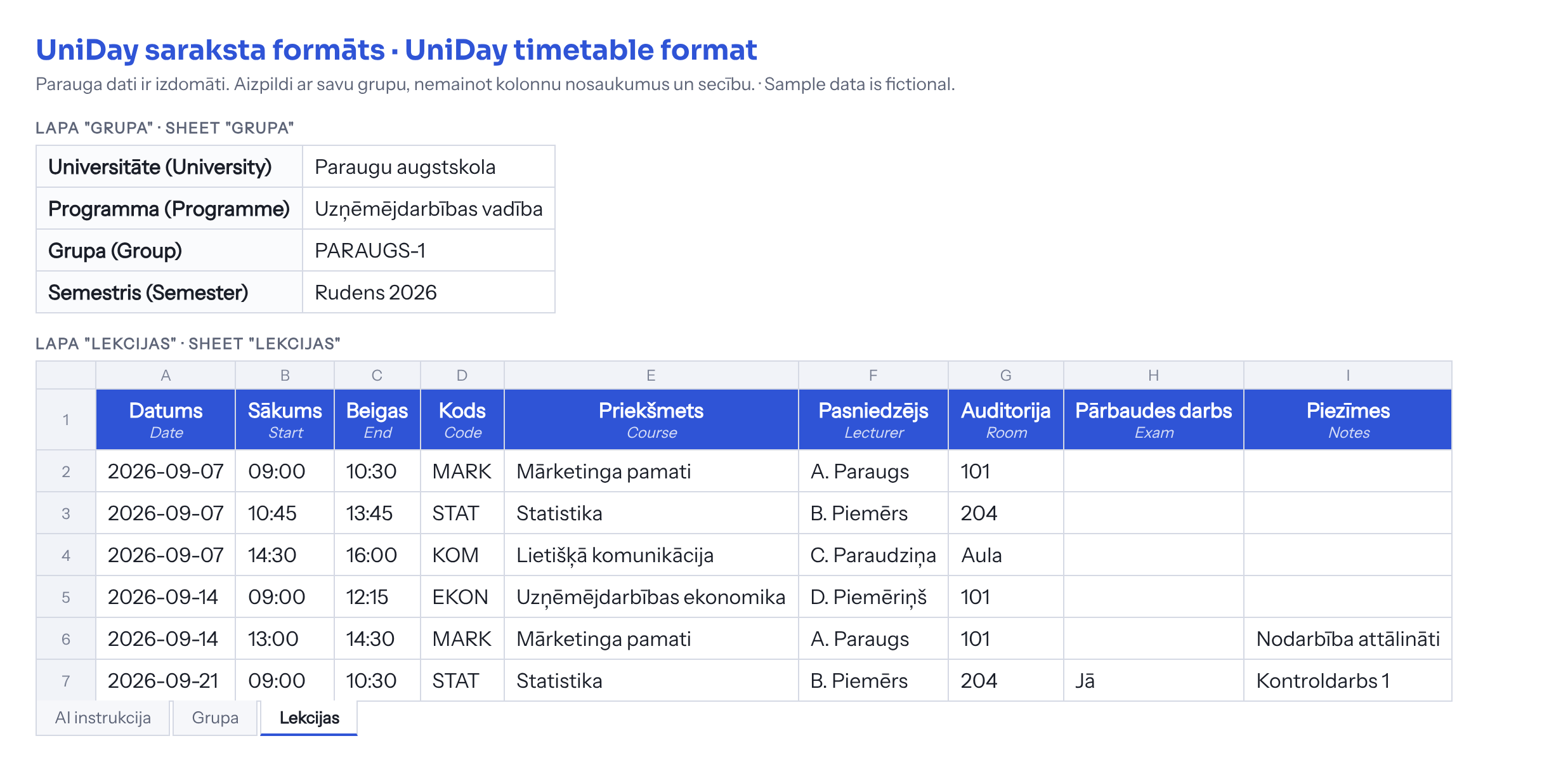
UniDay timetable format: sheet Grupa with university, programme, group and semester; sheet Lekcijas with columns Date, Start, End, Code, Course, Lecturer, Room, Exam, Notes
Format image with fictional sample data. If Excel is not convenient, give an AI assistant this image and your timetable and ask it to create the same table.
Download template (.xlsx) Download format image (.png) Import file You can also skip the template and import your timetable online: uniday.eu/imports. In the app you can load a timetable with a code or QR, or from a photo.
FAQ

Frequently asked questions

Is UniDay free?

Yes. The timetable, group updates, materials, the quiz and transport are free. Tests, reviews and AI summaries are UniDay Pro: free during testing, later 5 EUR per month.

Do I need an account?

No. The timetable, notes and transport work without an account, and your data stays on your phone. An account is needed for group updates, materials, summaries and tests.

Who can see group materials?

Only your group members and people who have your group's timetable code. AI checks that a material is study related, and classmates can report unsuitable content.

Are transport times real-time?

No. UniDay uses the official planned timetables of Rīgas satiksme and Vivi from the Latvian open data portal. They work offline but do not show delays.

Which universities does UniDay support?

Any. The first group is from the University of Latvia, and the standard template lets you add a group from any university.

Is UniDay an official university app?

No. UniDay is an independent student project and is not affiliated with the University of Latvia or any other university. Always check official information in your university's system.